

Lone Star Drone
Aug 22, 2025
A Guide for One of the Most Complex Airspace Regions
Introduction
Flying a drone around Dallas - Fort Worth can feel like threading a needle through moving traffic. The region stacks busy Class B shelves over a patchwork of Class D airports, and many grids along runway centerlines carry very low LAANC ceilings. Success starts with the right map and the right authorization. Use the FAA UAS Facility Maps to understand the maximum instantaneous ceilings in each grid, then request LAANC for quick approvals where available. If your operation requires more altitude or sits in a 0 ft grid, submit further coordination through FAADroneZone and plan for additional lead time.
DFW has special gotchas that can ground a mission if you miss them. Stadium TFRs prohibit drone operations within 3 nautical miles and up to 3,000 feet AGL from 1 hour before through 1 hour after covered games and races. Large runway centerline corridors often allow only very low altitudes, so shifting a block or two off the line can open up safer and higher ceilings. When in doubt, choose a location outside the low-ceiling bands or file early and get your approvals in place before you roll up to the site.


Why DFW is Uniquely Tricky
Dallas–Fort Worth concentrates more busy, high-consequence airspace in one metro area than almost anywhere in the country. At the center is the Class B core around DFW International, but that is only the beginning. Radiating out from the hub is a tight mosaic of towered airports, each with its own surface area, traffic patterns, and instrument procedures. Love Field to the east. Alliance to the north. Addison, Dallas Executive, Arlington, Grand Prairie, McKinney, Denton, Meacham, and more around the compass. On a Terminal Area Chart the shelves step up and down like terraces, and those steps do not respect neighborhood boundaries or project sites. It is very easy to lift off legally in one airspace slice, drift a block, and find yourself in a different altitude limit with a different controlling facility.
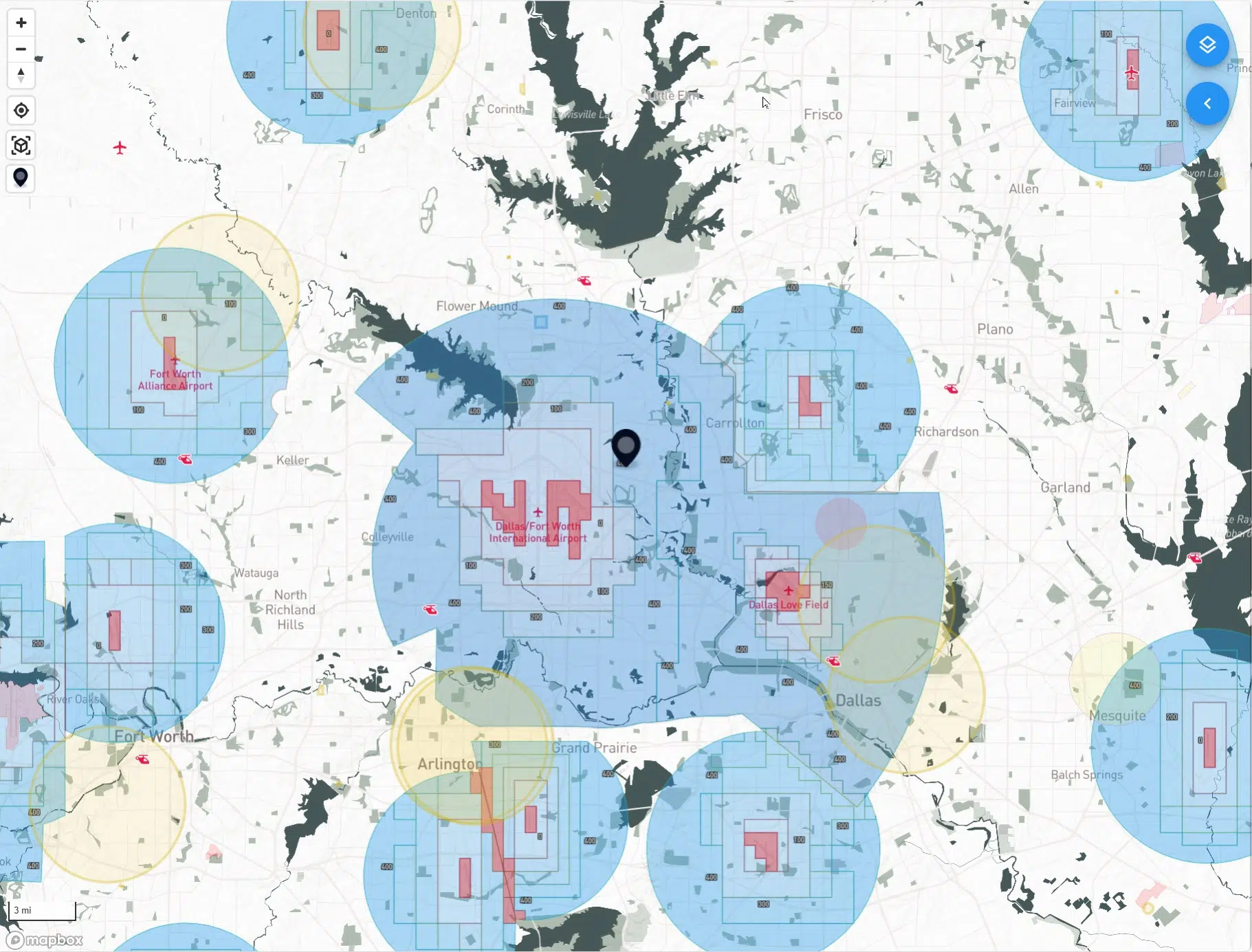
Runway geometry makes things even more complex. The north–south runways at DFW and DAL carve long approach and departure corridors across the Metroplex. In most LAANC apps these show up as a string of low-ceiling grids that look like red rivers running through town. They are not temporary restrictions. They are permanent UAS Facility Map limits designed to protect airliners that are descending through a few thousand feet AGL right overhead. Inside these corridors you should expect very low instant ceilings, often 0 to 200 feet AGL, or no instant authorization at all.
Traffic variety matters as well. This region launches and recovers everything from heavy cargo and business jets to flight school trainers and helicopters serving hospitals, stadiums, and news events. Add a military presence at NAS JRB Fort Worth and you get irregular flows, night operations, and pop-up training. For a drone pilot, that diversity shows up as changing tower hours, overlapping controlled airspace surfaces, and neighborhoods where the UASFM ceiling drops for reasons that are not obvious from the ground.
The practical result is that planning in DFW is never a single check. You match your site to the right grid. You read the posted ceiling instead of assuming 400 feet. You account for those centerline corridors and decide whether to accept a low ceiling, request further coordination, or relocate a short distance. You also time your mission around event days because stadium TFRs can quietly turn a normal job site into a no-drone zone for several hours. With the right maps and a habit of filing early, there is almost always a compliant way to fly. It just takes a little more choreography here than it does in most places.




The Building Blocks (Fast Refresher)
UAS Facility Maps (UASFM)
Think of the UASFM as your ceiling chart. Around towered airports the FAA divides the surface area into a grid of roughly one–nautical–mile squares. Each square shows the maximum altitude that ATC can approve instantly through LAANC. A square labeled 100 means you can usually receive an immediate authorization up to 100 feet AGL inside that square. A square labeled 0 means no instant approval is possible. The map itself is only a planning tool. It does not grant permission, and it does not replace TFR checks, local rules, or your Part 107 limitations. Treat it as the “what might be possible” layer you consult before you even open an authorization app.
LAANC (instant authorization)
LAANC is the mechanism that turns those UASFM ceilings into real, time–bound authorizations. If your flight area sits entirely inside a grid and your requested altitude is at or below the posted ceiling, you can usually receive approval in seconds. Most providers also surface basic situational awareness during the request, such as nearby TFRs or special use airspace, which helps you catch showstoppers before you roll gear onto a site. Keep your geometry tight. If your planned polygon crosses into a neighboring grid with a lower ceiling, the system will force you to honor the lowest value that touches your flight area.
Further coordination (LAANC manual or FAADroneZone)
Sometimes the work demands more altitude than the grid allows, or your site lands in a 0–foot square along a runway centerline. In those cases you request further coordination. Some LAANC apps support this directly; otherwise you submit through FAADroneZone. ATC reviews these manually, which takes longer and does not guarantee approval. Strong requests include a precise location, realistic altitude, dates and times with buffers, clear mitigations such as smaller polygons and shorter durations, and a plan to remain well clear of approaches or helicopter routes. If you are near a runway centerline, be ready with an alternative like shifting laterally a block or two or reducing altitude to match the grid.
What these tools do not do for you
Neither UASFM nor LAANC overrides stadium or security TFRs, event–day restrictions, or any local requirements on takeoff and landing sites. They do not excuse you from Part 107 rules such as VLOS, maximum groundspeed, night lighting, or the structure proximity allowance. They also do not validate your airspace interpretation. You still need to confirm that your site truly lies within the grid you selected, that your requested altitude reflects the lowest ceiling that touches your polygon, and that the time window you requested matches when you will actually fly.
A practical way to use all three
Start with the UASFM to understand what altitude is instantly possible. Draw the smallest workable polygon that fits your deliverable. If the posted ceiling covers your needs, request LAANC and go fly. If it does not, decide whether to move laterally into a higher–ceiling grid or file further coordination with a conservative plan. Build in lead time, especially near runway corridors or during busy seasons. The more precise your request, the more likely you are to get a yes.
Stadium and Event No-Fly Rules (The Big “Gotcha”)
Game days change the airspace. During NFL, MLB, and NCAA Division I football games, as well as NASCAR and Indy Car races, a security TFR activates around the venue. The cylinder is 3 nautical miles in radius and up to 3,000 feet AGL, and it runs from 1 hour before the published start time until 1 hour after the event ends. Within that bubble, drones are not authorized, even if you can normally fly there with LAANC. LAANC does not override a TFR.
In the DFW area this can affect AT&T Stadium in Arlington and Globe Life Field next door when the Cowboys or Rangers are playing. It can also affect college stadiums that host Division I football, such as Amon G. Carter Stadium at TCU and Gerald J. Ford Stadium at SMU. Not every sports event creates a TFR. MLS matches, high school games, and most concerts do not trigger the sports TFR by default. Some events may still produce a separate, event-specific TFR, so you need to check every time.
A few practical truths help keep you out of trouble:
The restriction follows the event schedule, not a fixed daily window. A noon kickoff and an evening kickoff will create different protected times.
The bubble applies to transit as well as takeoff and landing. You cannot clip the edge on your way somewhere else.
Authorizations inside controlled airspace do not grant permission inside an active TFR. If the TFR is up, you wait or you relocate.
Exceptions are narrow and typically limited to credentialed, coordinated operations under law enforcement or event security direction. Assume you are not an exception.
Build a quick pre-flight habit for game days. Check the team schedules for the nearest qualifying venues. Pull current TFRs and NOTAMs, paying attention to Zulu time versus local time. Confirm that your LAANC provider is showing the same information, then plan your mission window outside the TFR or shift your launch site beyond the 3 NM ring. If your deliverable cannot move, plan ahead with the client and schedule for a non-event day.
A Simple Planning Workflow for DFW
1) Pinpoint the site on the FAA UAS Facility Map
Start by dropping a pin on the UASFM and zoom in until you can clearly see the quarter-mile grids. Note the ceiling in every grid your operation might touch, then plan to honor the lowest ceiling that intersects your polygon. If your site sits in a runway centerline corridor, expect very low numbers. A small lateral move off the centerline often unlocks more altitude.
2) Sweep for TFRs and event windows
Before you set anything in stone, check current NOTAMs for stadium and security TFRs as well as VIP, wildfire, or disaster restrictions. Convert Zulu times to local and verify the published start and end times. If a 3 NM stadium TFR overlaps your site, reschedule or relocate outside the ring.
3) Draw the smallest workable polygon
Keep your requested area tight. Trim the polygon to only what you need for takeoff, landing, and filming. If your deliverable spans grids with different ceilings, consider breaking the job into two short authorizations rather than one large area that gets capped by the lowest square.
4) Request LAANC when you are at or below the posted ceiling
If the UASFM ceiling covers your needed altitude, submit a LAANC request for that exact polygon and a realistic time window. Include a small buffer so you do not need to refile if preflight takes longer. Keep a copy of the authorization on your device and in the job folder.
5) If you need more altitude or you are in a 0-foot grid, file for further coordination
Use a LAANC provider that supports manual review or submit through FAADroneZone. Build lead time. Strong requests are specific. Provide precise coordinates, dates and times, the minimum altitude that accomplishes the work, a compact polygon, expected duration, and mitigations such as staying a defined distance off the runway centerline corridor, using a visual observer, and keeping the aircraft below nearby manned traffic routes. Offer an alternate plan such as a lower altitude or a lateral relocation.
6) Lock in your operational checks
Plan to remain at or below 400 feet AGL unless you are using the 400-within-400 structure allowance. If you plan to use that allowance, your authorization must still cover the highest AGL you intend to reach. Maintain VLOS, use anti-collision lights for night, yield right of way to all manned aircraft, and verify weather, visibility, and cloud clearance per Part 107. Check nearby helipads, hospitals, and corridors where low helicopter traffic is common.
7) Confirm landowner permissions and launch logistics
Make sure your takeoff and landing spot is legal, practical, and safe. In DFW it is common to shift a launch point half a block to stay inside a higher-ceiling grid or outside a centerline band. Note parking, access gates, and any ground hazards such as power lines, antennas, or cranes.
8) Brief the mission like a checklist
Record the grid ceiling, authorization number, time window, maximum approved altitude, and any special constraints. Set headings, gimbal angles, and altitudes if you plan to refly the shot later. If you run a two-person crew, define roles for the PIC and VO, including callouts for approaching traffic or incursions.
9) Fly the plan and document it
Stay inside your approved polygon and altitude. If conditions or client needs change, pause and refile rather than pushing the envelope. After landing, capture screenshots of the flown path, keep your authorizations with the job files, and make a short note about conditions and airspace status for future refly work.
Follow this sequence every time in DFW. You will spend a few extra minutes up front, but you will avoid last-minute surprises, stay inside your approvals, and deliver confidently even in the busiest airspace in Texas.
DFW Quirks to Know Before You Go
Centerline low-ceiling bands
Those skinny corridors that trace the extended centerlines of DFW and DAL runways are not cosmetic. They reflect where arriving and departing traffic is funneled, so the UAS Facility Map ceilings drop sharply. If your site sits inside one of these bands, build your plan around very low altitudes or move laterally. A small shift of a block or two can jump you from a 0–200 ft grid to something more workable. When a refly is unavoidable at that location, design shots that succeed at low altitude and keep your polygon as tight as possible so you do not touch adjacent grids with even lower limits.

Stacked towers and overlapping surface areas
The Metroplex is ringed by towered airports with surface Class D airspace that meets and overlaps in awkward ways. It is common for a job site to straddle two or more grids that carry different ceilings and belong to different controlling facilities. Draw the smallest polygon that satisfies the deliverable and request LAANC for the grid that covers the bulk of the work. Fly inside that box and respect the lowest ceiling that touches your authorization. If you must cross into a neighboring grid, split the mission into two short approvals rather than filing one large area that gets capped by the most restrictive square.
“Zero” does not mean “never.”
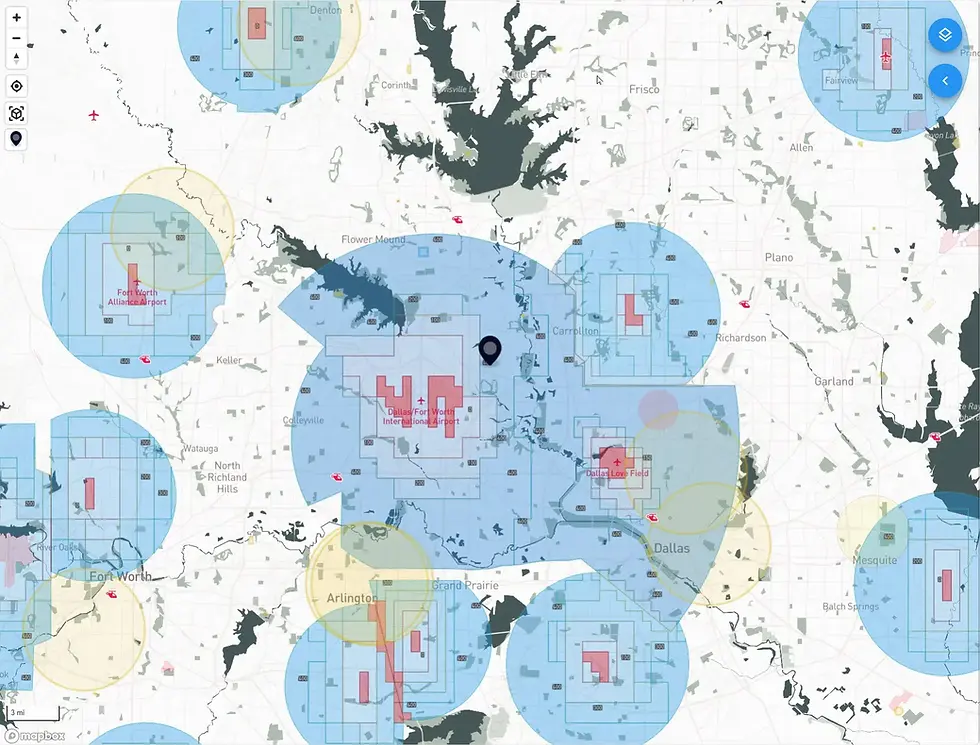
A 0-ft grid means there is no instant authorization, not that flight is impossible. If the operation can be made safe, you can ask for further coordination through a supporting LAANC provider or submit manually in FAADroneZone. Strong requests are precise. Provide exact coordinates, dates and times, a compact polygon, and the minimum altitude that accomplishes the task. Explain mitigations such as keeping a defined lateral offset from the centerline corridor, using a visual observer, and limiting duration. Offer an alternate plan at a lower altitude or a nearby relocation to show flexibility.

Maps are not permission
UAS Facility Maps and app screenshots are planning references. They do not replace an authorization where one is required and they do not override temporary restrictions. Before you launch, ensure you have an active authorization that matches where you will fly, the altitude you will use, and the time window you will actually operate. Keep the approval handy, verify there are no stadium or security TFRs in effect, and confirm that your takeoff and landing site is legal and practical. Treat the map as the starting point and the authorization as the go signal.

Example Mission: Arlington Roof Inspection Inside the DFW Approach Band
An Arlington roof job that sits beneath the DFW arrival corridor is a perfect test of disciplined planning. Start with the UAS Facility Map and zoom until your quarter-mile grids are crisp. Note the ceiling in every grid that your planned polygon might touch. In this corridor the numbers often read between 0 and 200 feet AGL. Build the mission around that reality. If the grid shows 150 feet, plan a 150-foot cap and design your shots to succeed at or below that height. If you truly need more altitude, decide early whether you will file for further coordination or shift laterally off the centerline to a neighboring grid with a higher ceiling.
Draw the smallest workable polygon that covers your takeoff point, landing spot, and camera geometry. Trim away parking lots or streets that you do not need so you are not forced to honor a lower ceiling in an adjacent square. Submit a LAANC request for the exact polygon and time window you intend to fly. Keep a copy of the authorization with the job folder and on your device. If your deliverable requires a higher vantage point than the posted ceiling allows, prepare a fallback. One option is a lateral move of a block or two to reach a higher-ceiling grid. Another option is a manual request through further coordination or FAADroneZone that explains why the higher altitude is necessary and how you will keep clear of manned traffic flowing along the corridor.
While the airspace determines your ceiling, the ground determines how you execute. Walk the site and identify ground hazards like power lines, rooftop antennas, and nearby helipads or hospitals. If you intend to use the 400-within-400 structure allowance, confirm that your authorization still covers the highest AGL you will reach and that your flight path remains within 400 feet laterally of the structure. Set a conservative plan for wind, establish a home point that keeps the aircraft clear of foot traffic, and define clear roles for the PIC and a visual observer who watches for low helicopter traffic common to the area.
Design the shot list to match the ceiling. A nadir overview at the approved maximum altitude can serve as your master. Oblique stills from the four corners at a consistent height and gimbal angle will give you reliable before and after pairs. Lateral passes at mid-roof height can capture seams, drains, and equipment. If the ceiling is very low, consider a two-position plan that includes a second launch point outside the corridor where you can legally climb for a high context establishing still.
Finish your planning with a quick event check. If the site is within three nautical miles of AT&T Stadium, verify the Cowboys schedule and pull current TFRs and NOTAMs. On home game days a stadium TFR closes the air to drones from one hour before kickoff until one hour after the final whistle. If a TFR overlaps your window, reschedule for a different time or move the mission outside the three-mile ring. Confirm that your LAANC provider reflects the same restriction and do not rely on prior authorizations to cover a new day.
On the day of the shoot, arrive early, reconfirm the grid ceiling, and submit your LAANC request if you have not already. Brief the crew on the max altitude, polygon boundaries, nearby traffic flows, and abort criteria. Fly the plan inside the approved box. If anything changes, pause and adjust the authorization rather than pushing the envelope. Document the flight path, save your approvals with the project, and note sun angle, wind, and airspace status so you can recreate the mission for the after footage.


Handy Official Resources
FAA UAS Facility Maps (UASFM): What ceilings are possible via LAANC around each airport. FAA
LAANC overview & providers: Instant authorizations and situational awareness. FAA
Part 107 Airspace Authorizations: How “further coordination” works, including 0-ft grids. FAA
FAADroneZone: Manual authorizations and other services. FAADroneZone
Stadium TFRs (“No Drone Zone”): Rules and affected events. FAA
DFW TAC (official FAA chart PDF): Visual overview of Class B shelves. Aeronav